
Have you ever wished you could see everything around your car at once? Nissan’s Bird’s Eye View gives you just that—a clear, 360-degree view from above.
This smart feature helps you park with ease, avoid obstacles, and drive more confidently. If you want to know how this technology works and how it can make your driving safer and stress-free, keep reading. Your next parking experience might just become your favorite part of driving.
Nissan Bird’s Eye View Basics
The Nissan Bird’s Eye View system helps drivers see all around their car. It gives a top-down view to make parking easier and safer.
This system uses cameras and software to create a clear image of the car’s surroundings. It shows what is near the vehicle on the display screen.
Core Components
The Bird’s Eye View system has several key parts. These parts work together to give a full view around the car.
- Cameras placed around the vehicle
- A computer to process images
- A display screen inside the car
- Software that combines the camera images
Camera Placement
Cameras are placed in specific spots on the car. Each camera captures a different angle around the vehicle.
- One camera at the front grille
- One camera at the rear bumper
- Cameras under each side mirror
These positions help cover all sides of the car. The system uses these views to build the full image.
Image Stitching Process
The system combines images from all cameras into one picture. This process is called image stitching.
The software adjusts the pictures to match edges. It removes overlaps and joins images smoothly.
- Corrects distortions from wide-angle lenses
- Aligns images to create a seamless top-down view
- Updates in real-time as the car moves
Key Features Of Bird’s Eye View
The Nissan Bird’s Eye View system helps drivers see all around their car. It uses several cameras to create a full view from above. This makes parking and driving safer and easier.
This technology shows what is near the vehicle. It lets drivers avoid obstacles and park with confidence.
360-degree Surround Vision
The system uses four cameras placed around the car. They capture images from the front, back, and sides. These images combine to form a single overhead view.
This 360-degree view helps drivers see everything close to the vehicle. It shows objects that might be in blind spots.
Parking Assistance
Bird’s Eye View makes parking easier in tight spaces. The overhead view shows the car’s position relative to parking lines and other cars.
Drivers can steer with better precision. This reduces the risk of hitting other vehicles or curbs.
Obstacle Detection
The system detects objects close to the car. It alerts the driver to obstacles like poles, walls, or pedestrians.
Visual warnings appear on the screen. Some models also provide sound alerts to draw attention.
Technology Behind The System
Nissan’s Bird’s Eye View system gives drivers a 360-degree view around their car. It helps to park and avoid obstacles easily. The technology uses cameras and sensors combined with real-time image processing.
This system turns camera images into a single, clear view. It shows the surroundings from above, making driving safer and simpler.
Wide-angle Cameras
The system uses several wide-angle cameras placed around the car. These cameras capture images from different sides, including front, rear, and mirrors.
Wide-angle lenses cover a large area. They help capture the full view close to the vehicle, reducing blind spots.
- Front camera shows what is ahead
- Rear camera helps when backing up
- Side cameras cover the car’s sides
- Wide lenses capture more area than normal cameras
Real-time Image Processing
The system uses a computer to process camera images in real time. It stitches images together to make one clear top-down view.
This processing removes distortion from wide-angle lenses. It also adjusts colors and brightness so images match well.
- Combines multiple camera feeds smoothly
- Corrects lens distortion for accurate views
- Updates images instantly for real-time feedback
- Creates a seamless 360-degree bird’s eye perspective
Sensor Integration
The Bird’s Eye View system works with sensors around the car. These sensors detect objects near the vehicle and add warnings to the display.
The sensors use ultrasonic waves to measure distance. They help the driver avoid hitting nearby obstacles while parking or driving slowly.
- Ultrasonic sensors detect close objects
- Distance information shows on the screen
- Alerts warn the driver of nearby obstacles
- Improves safety during tight maneuvers
Benefits For Driver Safety
The Nissan Bird’s Eye View system helps drivers see their surroundings better. It uses cameras to create a top-down image of the car and nearby areas. This feature aids in safe driving and parking in tight spaces.
By showing what is around the car, the system helps drivers avoid accidents and stay aware of blind spots. It improves overall safety on the road.
Enhanced Visibility
The system uses multiple cameras to give a 360-degree view around the car. This view shows objects and obstacles that are hard to see from the driver’s seat.
- Helps in tight parking spaces
- Shows curbs, pedestrians, and other vehicles
- Reduces the risk of hitting unseen objects
Reduced Blind Spots
Blind spots cause many accidents. The Bird’s Eye View system lowers this risk by making blind spots visible. Drivers get extra help to check areas that side and rear mirrors miss.
| Blind Spot Area | Camera Coverage |
| Left Side | Wide-angle side camera |
| Right Side | Wide-angle side camera |
| Rear | Rearview camera |
| Front | Front camera |
Accident Prevention
The system helps drivers avoid collisions by showing clear images around the car. It warns about obstacles and moving objects during low-speed driving.
Key accident prevention features include:
- Real-time 360-degree view
- Visual alerts for close objects
- Helps during parking and tight turns
- Reduces chance of hitting pedestrians or poles
Using Bird’s Eye View Effectively
The Nissan Bird’s Eye View system helps drivers see the area around their car. It uses cameras placed on all sides of the vehicle. This gives a complete view from above.
Using this system can make parking and tight maneuvers safer. It reduces blind spots and helps avoid obstacles near the car.
Activating The System
To turn on the Bird’s Eye View, press the camera button on the dashboard. The system activates automatically when you shift into reverse. Some models also activate it when you drive at low speeds.
Interpreting The Display
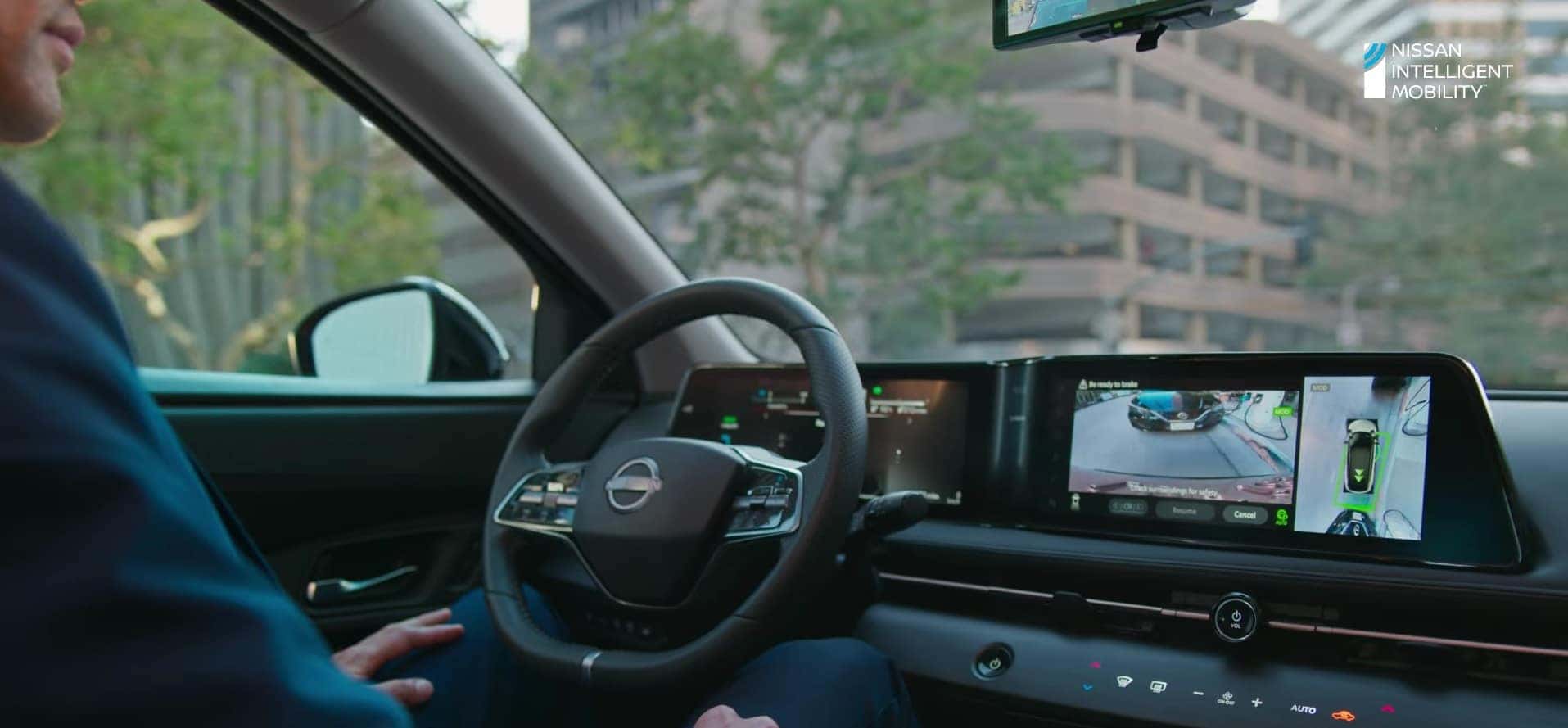
The display shows a 360-degree top-down view of your car. It combines images from cameras on the front, rear, and sides. The screen highlights nearby objects and parking lines for guidance.
- Look for colored lines that show your car’s path.
- Notice warnings or alerts for close objects.
- Use the zoom function to see details in tight spots.
Common Usage Tips
Follow these tips to get the most from the Bird’s Eye View system:
| Tip | Reason |
| Keep cameras clean | Clear images for better visibility |
| Check mirrors and surroundings | Do not rely only on the system |
| Use system at low speeds | Better control and reaction time |
| Practice using the system | Gain confidence in reading the display |
Credit: www.bignissani90.com
Limitations To Consider
The Nissan Bird’s Eye View system offers a 360-degree view around your car. This helps in parking and avoiding obstacles. Still, the system has some limitations to keep in mind.
Understanding these limits can help you use the system safely and effectively.
Weather Impact
Bad weather can affect the cameras and the system’s performance. Rain, snow, or fog can blur the camera lenses. This reduces the clarity of the images shown on the screen.
- Heavy rain may cause blurry or unclear images.
- Snow can cover the cameras and block their view.
- Fog reduces visibility and image sharpness.
- Strong sunlight may cause glare or reflections.
Camera Maintenance
Keeping the cameras clean is important for the system to work well. Dirt, dust, or mud can block the camera lenses. This leads to poor image quality and can cause false warnings.
| Maintenance Task | Reason |
| Clean camera lenses regularly | Removes dirt and improves image clarity |
| Check for damage or cracks | Ensures cameras work without faults |
| Avoid high-pressure washing | Prevents water damage to cameras |
System Accuracy
The Bird’s Eye View system uses cameras and sensors to create a view around the car. It may not always be 100% accurate. Small objects or low obstacles might not appear clearly.
Keep these points in mind for system accuracy:
- The system may lag slightly in showing real-time images.
- Camera angles can create blind spots in some views.
- Software updates can improve or fix accuracy issues.
- Always check surroundings manually before moving.
Comparing With Other Safety Tech
Nissan Bird’s Eye View gives a complete view around your car. It helps you park and avoid obstacles. This system uses multiple cameras to create a single image.
Other safety technologies help drivers in different ways. Let’s compare Bird’s Eye View with some common safety features.
Traditional Rearview Cameras
Traditional rearview cameras show what is directly behind the car. They activate when you shift into reverse. This helps drivers see low objects or people behind them.
Bird’s Eye View offers a wider perspective. It shows all sides of the vehicle, not just the rear. This makes parking and tight turns easier and safer.
Blind Spot Monitors
Blind spot monitors warn drivers about vehicles in hard-to-see areas. They use sensors to detect cars next to or behind you. Alerts appear on side mirrors or dashboards.
- Blind spot monitors focus on side and rear areas only.
- They alert but do not provide a full visual display.
- Bird’s Eye View gives a real-time, 360-degree video feed.
- This feed helps drivers see all around the car, not just blind spots.
Advanced Driver Assistance Systems
Advanced Driver Assistance Systems (ADAS) include features like lane keep assist, adaptive cruise control, and automatic emergency braking. They use cameras and sensors to help control the car.
| Feature | Purpose | Comparison with Bird’s Eye View |
| Lane Keep Assist | Keeps car in lane | Bird’s Eye View shows surroundings but does not control steering |
| Adaptive Cruise Control | Maintains safe distance from cars ahead | Bird’s Eye View does not manage speed or distance |
| Automatic Emergency Braking | Stops car to avoid collision | Bird’s Eye View helps with visibility but no braking control |
Credit: www.orangevillenissan.com
Future Of Bird’s Eye View Tech
Nissan’s Bird’s Eye View system shows a 360-degree image around the car. It helps drivers see blind spots and park safely. The future of this technology looks very promising with new improvements.
Developers focus on making the system smarter and easier to use. This will make driving safer and more comfortable for everyone.
Ai And Machine Learning Integration
Artificial intelligence helps the Bird’s Eye View system learn from driving patterns. Machine learning improves image recognition and object detection. This means the system can better identify obstacles and predict possible dangers.
- Detect moving objects like pedestrians and bikes
- Adapt to different lighting and weather conditions
- Improve accuracy in tight spaces
- Provide real-time alerts based on driver behavior
Improved Sensor Fusion
Sensor fusion combines data from cameras, radars, and ultrasonic sensors. This improves the system’s ability to create a clear image around the vehicle. Future systems will use better sensors for sharper and faster responses.
| Sensor Type | Current Use | Future Improvement |
| Camera | 360-degree view | Higher resolution and night vision |
| Radar | Detects large objects | More precise object distance measurement |
| Ultrasonic | Close-range detection | Faster response in tight parking spots |
Enhanced User Interfaces
The future Bird’s Eye View will have easier controls and clearer displays. Touchscreen and voice commands will help drivers focus on the road. The system may also offer customizable views and alerts.
Possible features in new interfaces include:
- Split-screen views showing different angles
- Augmented reality overlays to highlight hazards
- Automatic zoom on moving objects
- Integration with smartphone apps for remote monitoring

Credit: www.youtube.com
Frequently Asked Questions
What Is Nissan Bird’s Eye View?
Nissan Bird’s Eye View is an advanced camera system. It provides a 360-degree view around the vehicle. This feature aids in parking and maneuvering in tight spaces. It uses multiple cameras to create a composite image. This enhances driver awareness and safety.
How Does Nissan’s 360-degree Camera Work?
The 360-degree camera system uses four wide-angle cameras. These are strategically placed around the vehicle. The images are combined to create a bird’s-eye view. This seamless view helps drivers see obstacles. It significantly improves parking accuracy and safety.
Is Nissan Bird’s Eye View Available On All Models?
Nissan Bird’s Eye View is available on select models. It’s typically offered on higher trims or as an optional package. Availability may vary based on the model and year. Check with local dealerships for specific model availability. It’s a premium feature enhancing safety and convenience.
Can Bird’s Eye View Improve Parking Safety?
Yes, Bird’s Eye View significantly improves parking safety. It offers a complete view of the surroundings. This reduces blind spots and minimizes collision risks. Drivers can park with greater confidence and precision. It’s a valuable tool for urban and crowded environments.
Conclusion
Nissan Bird’s Eye View shows your car from above. It uses cameras around the vehicle to create this view. This helps you park safely and avoid obstacles. You can see everything close to your car clearly. The system makes driving in tight spaces easier.
It gives you extra confidence on the road. Using this technology can reduce parking accidents. Nissan’s feature offers helpful views without distraction. It’s a smart tool for safer driving every day.




