
Imagine seeing your entire Minecraft world spread out beneath you, like a real pilot soaring high above the clouds. Getting a bird’s eye view on your Minecraft map can change the way you explore and build.
You’ll spot hidden places, plan your next move, and navigate with ease. If you’ve ever wished for a better way to understand your map, this guide is exactly what you need. Keep reading, and you’ll learn simple tricks to get that perfect overhead view—no complicated steps, just straightforward tips you can use right now.

Credit: www.reddit.com
Setting Up Your Minecraft World
Getting a bird’s eye view on your Minecraft map starts with a good setup. You need to prepare your world carefully to explore efficiently.
This guide helps you set up the best environment for your Minecraft adventure. Follow the steps to build a map that shows the big picture.
Choosing The Right Game Mode
Selecting the correct game mode affects how you see and interact with your Minecraft world. Creative mode lets you fly and explore easily. Survival mode adds challenges but limits your movement.
- Creative Mode:Fly freely and build without limits.
- Survival Mode:Collect resources and face dangers.
- Adventure Mode:Play custom maps with restrictions.
Preparing Your Environment
Before you start exploring, set up your environment to make navigation easier. Adjust the time of day and weather to improve visibility.
| Setting | Benefit |
|---|---|
| Daytime | Better lighting for clear views |
| Clear Weather | No fog or rain to block sight |
| Flat Terrain (optional) | Easier to spot landmarks from above |
Selecting The Ideal Seed
The seed you choose decides your world’s layout. Some seeds offer wide open spaces and mountains that make it easy to get a bird’s eye view. Others have dense forests or oceans that block your view.
Here are tips for picking the right seed:
- Look for seeds with varied terrain like hills and plains.
- Choose seeds with landmarks such as villages and temples.
- Test seeds in creative mode first to see the map layout.
Tools For Bird’s Eye View
Getting a bird’s eye view on your Minecraft map helps you see the whole world. It makes exploring easier and planning builds simple.
There are different tools you can use to get this top-down perspective. They include in-game items, mods, and external programs.
Using Maps
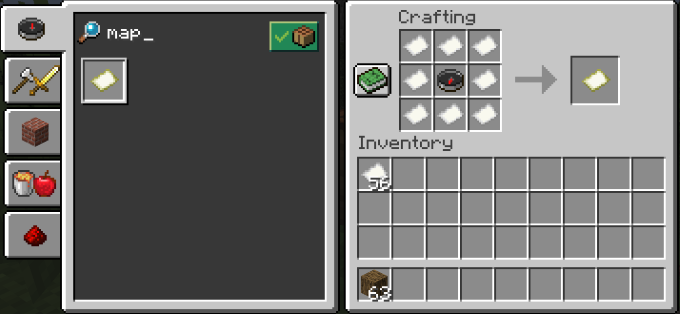
Maps in Minecraft show a top-down view of the area around you. You can craft them using paper and a compass. When you hold and move with a map, it fills in the details of the land.
Maps are simple tools for a bird’s eye view. You can also create empty maps to explore new places or copy maps to share with friends.
Exploring Mini-maps And Mods
Mini-map mods add a small map to your screen. This map shows your location and nearby land from above. It helps you see more without opening your inventory.
Popular mini-map mods include features like waypoints and zoom. They make exploring large worlds easier and safer.
- Displays real-time location
- Shows terrain and player markers
- Offers zoom and map customization
- Includes waypoint setting
Leveraging Third-party Tools
Third-party tools let you view Minecraft maps outside the game. You can upload your world files to see a full map from above. This helps with planning and navigation.
These tools often show biomes, structures, and player positions. They give a clear and detailed bird’s eye view that is hard to get inside Minecraft.
- Upload world files to generate maps
- View biomes, villages, and other features
- Plan building projects with clear visuals
- Use zoom and layers for details
Creating An Elevated Perspective
Seeing your Minecraft world from above helps you plan better. It gives a clear view of the land and buildings.
There are several ways to get a bird’s eye view. You can build tall structures or use special items to fly.
Building Observation Towers
Observation towers are tall buildings you make to see far. They give a steady place to look around your map.
Use blocks like wood, stone, or glass to build your tower. Add stairs or ladders to climb up easily.
- Choose a high spot for the tower base
- Build wide enough to stand safely
- Add windows or open spaces for better views
- Place lights to keep it safe at night
Utilizing Elytra For Aerial Views
Elytra are wings that let you glide in the air. You can fly over your world for a wide view.
To use Elytra, equip them in the chest slot. Jump from high places and glide to explore from above.
- Find or craft Elytra before trying to fly
- Jump from tall structures or cliffs
- Use fireworks for longer and faster flight
- Watch your durability to avoid damage
Using Creative Mode To Fly
Creative mode lets you fly freely without limits. You can move up and down to get the best views.
Switch to creative mode by changing game settings. Use the jump and sneak buttons to rise and descend.
- Press space bar twice to start flying
- Hold shift to go down while flying
- Fly over any area to see details
- Use this mode to build or explore easily
Credit: www.online-tech-tips.com
Advanced Techniques
Getting a bird’s eye view in Minecraft lets you see your world from above. This helps with building and exploring large areas. Some methods need special skills or tools.
This guide covers three ways to get a high viewpoint: using command blocks, using spectator mode, and capturing images or videos.
Using Command Blocks For Viewpoint Control
Command blocks can move your viewpoint quickly to any location. You can set them to teleport you high above the map. This creates a fast way to get a top-down view.
- Place a command block in your world.
- Enter the teleport command with high coordinates, like
/tp @p ~ 150 ~. - Activate the command block to move your view above the map.
- Use additional commands to adjust your angle or position.
Exploring Spectator Mode
Spectator mode lets you fly freely through blocks. You can move high above your world and look down from any angle. This mode gives a smooth way to explore without limits.
| Key | Action |
| W, A, S, D | Fly forward, left, back, right |
| Space | Fly upward |
| Shift | Fly downward |
| Scroll Wheel | Change view through blocks |
Capturing Screenshots And Videos
After getting a high view, you can take screenshots or videos. This helps you save or share your map views. You can use Minecraft’s built-in tools or external software.
Use these tips for capturing:
- Press F2 to take a screenshot in Minecraft.
- Use screen recording software to capture videos.
- Adjust your camera angle before capturing.
- Try different heights for varied views.
Tips For Efficient Map Exploration
Exploring your Minecraft map is fun and helps you find new places. A bird’s eye view makes it easier to see the land layout.
Use smart methods to mark, organize, and avoid mistakes on your map. This guide shares simple tips for better map use.
Marking Key Locations
Mark important spots on your map to find them fast later. Use different colors and symbols for each place type.
- Use banners or signs in the game to tag places.
- Mark villages, mines, and resource spots.
- Note your home base clearly on the map.
- Keep landmarks like rivers and mountains visible.
Organizing Your Map Data
Keep your map data tidy for easy reading. Group similar locations and use labels or notes.
| Location Type | Marker Color | Notes |
| Home Base | Blue | Safe zone, storage |
| Village | Yellow | Trading spots |
| Mine | Red | Ore resources |
| Landmark | Green | Easy navigation |
Avoiding Common Pitfalls
Avoid errors that slow down your map work. Check your map often and update it with new info.
- Don’t overcrowd the map with too many marks.
- Update map data after big changes in the world.
- Keep backups of your map files regularly.
- Use clear symbols to prevent confusion.
Credit: www.online-tech-tips.com
Frequently Asked Questions
How Can I Get A Bird’s Eye View In Minecraft?
You can get a bird’s eye view by flying in Creative mode or using a map viewer tool. Elytra wings with fireworks also help you soar high for a top-down perspective.
What Tools Help Achieve A Top-down Minecraft Map View?
Using in-game maps, external map viewers like Amidst, or mods can provide a clear top-down view of your Minecraft world. These tools display terrain and structures from above.
Is Creative Mode Best For Bird’s Eye Views?
Yes, Creative mode allows unlimited flight, making it easy to get a high vantage point and explore the Minecraft world from above without restrictions.
Can I View My Minecraft Map From Above Without Flying?
Yes, you can use map items or external software to view your Minecraft map from above without flying in-game. These options offer static bird’s eye views.
Conclusion
Exploring Minecraft from above offers a fresh perspective. You see the vast landscapes and creative builds in full view. Use maps and mods to enhance your experience. They help you find hidden treasures and plan your next adventure. Experiment with different tools to find what suits you best.
Practice makes perfect, so keep trying new techniques. Enjoy the process and make the most of your gaming sessions. Remember, the journey is as exciting as the destination. Happy crafting!




