
Have you ever wanted to watch birds nesting right from your home? Setting up a wireless bird box camera lets you do just that—giving you a front-row seat to nature’s most fascinating moments.
Imagine catching baby birds hatching or seeing your feathered visitors up close without disturbing them. In this guide, you’ll learn simple steps to set up your own wireless bird box camera quickly and easily. By the end, you’ll be ready to enjoy endless hours of amazing birdwatching right on your screen.
Let’s get started!
Credit: nestera.nl
Choosing The Right Bird Box Camera
Choosing the right wireless bird box camera is key to enjoying clear views of bird activity. The right camera captures detailed footage without disturbing the birds. It must fit your setup and meet your needs for video quality and ease of use. Consider the type, features, and price before buying. This helps avoid issues and ensures a smooth experience.
Types Of Wireless Cameras
Wireless bird box cameras come in several types. Each type suits different needs and environments.
- Wi-Fi Cameras:Connect easily to your home network. Offer live streaming to your phone or computer.
- Battery-Powered Cameras:No wires needed. Good for remote locations but require regular charging.
- Solar-Powered Cameras:Use solar panels for power. Ideal for outdoor setups with good sunlight.
- Hidden Cameras:Designed to blend into the bird box. Less likely to scare birds away.
Key Features To Look For
Some features matter more than others for a wireless bird box camera.
- Video Quality:Look for at least 720p resolution for clear images.
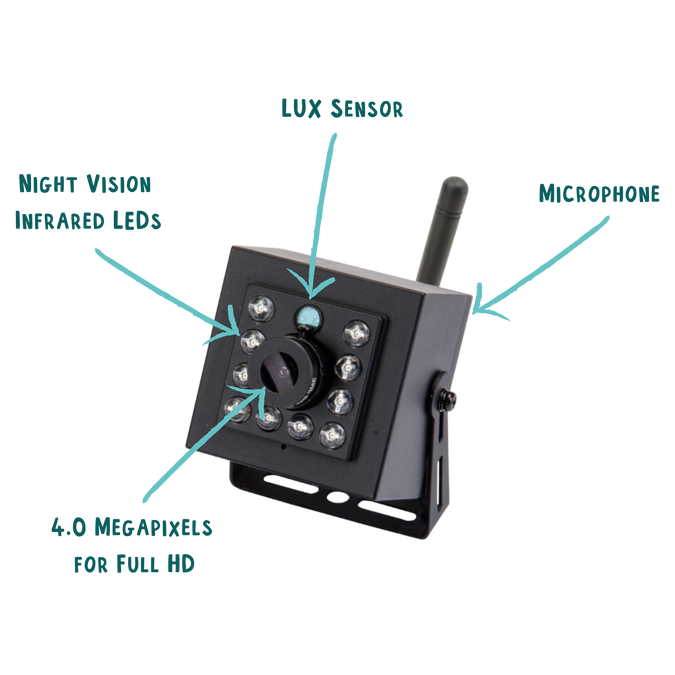
- Night Vision:Essential for capturing activity in low light or at night.
- Motion Detection:Triggers recording or alerts when birds enter the box.
- Easy Installation:Choose cameras with simple setup and mounting options.
- Weather Resistance:Must handle rain, wind, and temperature changes.
- Storage Options:Check if it supports cloud or local storage for videos.
Budget Considerations
Prices for wireless bird box cameras vary widely. Set a budget that fits your needs.
- Basic Models:Usually cost less but may lack advanced features.
- Mid-Range Cameras:Balance quality and price well for most users.
- High-End Cameras:Offer superior video, durability, and smart features.
Think about long-term value, not just the initial cost. A reliable camera saves money on repairs and replacements.
Preparing The Bird Box
Preparing the bird box is a crucial first step for setting up a wireless bird box camera. The right preparation ensures clear footage and a safe home for birds. It helps avoid common problems like poor signal or camera damage. Proper preparation also makes the installation process smoother and more effective.
Selecting The Location
Choose a quiet spot away from heavy foot traffic. Look for a shaded area to avoid direct sunlight on the camera lens. Place the bird box high enough to keep it safe from predators. Ensure the location has good Wi-Fi coverage for the wireless camera. Face the entrance away from strong winds and rain.
Cleaning And Inspecting The Box
Remove old nesting materials and debris. Check for cracks or holes that could let in water or predators. Clean the inside gently with warm water and a soft brush. Avoid harsh chemicals that might harm birds. Inspect the mounting area for stability and strength.
Ensuring Safe Installation
Use sturdy brackets or mounts to fix the bird box securely. Avoid using nails that can damage the box or tree. Make sure cables do not hang loosely or block the entrance. Protect the camera from extreme weather with a small cover or shield. Double-check the box is stable and will not fall in strong wind.
Installing The Camera
Installing the wireless bird box camera is a crucial step to capture clear and steady footage. Proper installation ensures the camera works well and lasts long outdoors. This section guides you through mounting, powering, and adjusting the camera angle for the best view.
Mounting Techniques
Choose a sturdy spot to mount the camera. Tree branches, poles, or the bird box itself are good options. Use screws or strong straps to hold the camera firmly. Avoid places with too much movement or vibration. Keep the camera stable to prevent blurry images.
- Secure the camera to avoid shaking.
- Use weather-resistant mounts for outdoor use.
- Place it near the bird box entrance for clear views.
Powering Your Camera
Wireless bird box cameras need a reliable power source. Many models use rechargeable batteries or solar panels. Check battery life regularly to avoid interruptions. Solar panels work well in sunny locations and reduce maintenance. Ensure wires are protected from weather and animals.
- Use rechargeable batteries for easy power management.
- Solar panels offer continuous power in daylight.
- Keep power connections safe and dry.
Adjusting The Camera Angle
Set the camera angle to capture birds clearly. Aim for the bird box entrance or nesting area. Tilt and rotate the camera to avoid glare and shadows. Test the view on your device before finalizing. Small adjustments can make a big difference in footage quality.
- Point the camera directly at the target area.
- Adjust to reduce sunlight glare.
- Check the view on your screen before fixing.

Credit: nestera.us
Setting Up The Wireless Connection
Setting up the wireless connection for your bird box camera is a key step in ensuring you get clear, uninterrupted footage of your feathered visitors. This process involves linking the camera to your home Wi-Fi network so you can access the live feed remotely. Let’s dive into how you can connect to Wi-Fi, solve common signal problems, and keep your network secure.
Connecting To Wi-fi
Start by powering up your bird box camera and opening the companion app on your phone or tablet. Most cameras will guide you through a setup wizard that asks for your Wi-Fi network name (SSID) and password. Make sure your device is close enough to the router during this step to avoid connection errors.
If the app offers a QR code scan or WPS button option, try those for a quicker setup. Remember, a stable connection depends on a strong signal, so placing your router centrally or using a Wi-Fi extender might help if your camera is far away.
Troubleshooting Signal Issues
Low signal strength is a common cause of dropped connections or poor video quality. You can test your signal by checking the signal bars on the camera’s app or using a Wi-Fi analyzer tool on your phone.
- Try moving the router closer to the bird box or vice versa.
- Remove physical obstacles like thick walls or metal objects that may block the signal.
- Switch to a less crowded Wi-Fi channel if many networks overlap in your area.
If your camera still struggles to stay connected, consider using a dedicated Wi-Fi repeater to boost the signal. Have you noticed your camera’s signal dropping at certain times? This could indicate interference from other devices, so switching channels might be the fix you need.
Securing Your Network
Securing your wireless connection protects your bird box camera from unauthorized access. Start by using a strong, unique password for your Wi-Fi network.
Enable WPA3 or at least WPA2 encryption on your router settings. Avoid default or easy-to-guess passwords to keep your camera feed private.
- Regularly update your router’s firmware to patch security vulnerabilities.
- Disable remote management features unless absolutely necessary.
- Consider setting up a guest network specifically for your camera if your router supports it.
How often do you check your Wi-Fi security settings? Small changes here can make a big difference in protecting your data and the privacy of your backyard wildlife observations.
Configuring Camera Settings
Configuring your wireless bird box camera settings is key to capturing clear and timely footage. Proper settings help you see birds in great detail and avoid missing important moments. Adjusting resolution, frame rate, and notifications tailors the camera to your needs and saves storage space.
Adjusting Resolution And Frame Rate
Set the camera resolution based on your device’s storage and internet speed. Higher resolution offers clearer images but uses more space. Lower resolution saves space but reduces detail.
Frame rate controls how smooth the video looks. A higher frame rate shows more motion but uses more power and storage. Choose a frame rate between 15 and 30 frames per second for best results.
Enabling Motion Detection
Turn on motion detection to capture bird activity automatically. The camera records only when it senses movement. This saves battery life and storage space.
Adjust sensitivity to avoid false alarms from wind or leaves. Set it high enough to catch small birds but low enough to ignore non-bird movements.
Setting Up Alerts And Notifications
Enable alerts to get instant updates on your phone or email. Notifications let you know when birds visit the box.
Customize alert times to avoid disturbances during night hours. Use a quiet mode if your camera has one, to reduce noise and light.
Monitoring And Recording Footage
Set up your wireless bird box camera to capture clear footage day and night. Use a reliable app or software to monitor live video and store recordings securely. Ensure your device has enough battery or a power source for continuous operation.
Installing a wireless bird box camera is an exciting venture that allows you to peek into the secret lives of birds. Once your camera is set up, monitoring and recording footage becomes essential. This enables you to capture stunning behaviors and moments that you might otherwise miss. Let’s explore how you can effectively monitor and record the activities in your bird box.Using Mobile And Desktop Apps
With the right apps, you can easily view live footage of your bird box from anywhere. Most wireless bird box cameras come with dedicated mobile and desktop applications. Download these apps on your smartphone or computer for real-time streaming. These apps often provide notifications when movement is detected, ensuring you never miss a moment. Imagine receiving an alert just as a nestling hatches—an experience you can share with friends and family instantly!Storage Options
Consider where your footage will be stored. Many cameras offer cloud storage, allowing you to access your recordings from any device with internet access. This is a convenient option if you’re frequently on the go. Alternatively, you might opt for an SD card, which provides a reliable, local storage solution. Ensure your SD card has enough capacity, especially during nesting season when activity peaks.Managing Recorded Videos
Once your videos are recorded, managing them effectively is crucial. Organize your footage by date or behavior to easily locate specific moments later. This organization can help you track the development of the birds over time. Editing software can enhance your videos, allowing you to create highlights or shareable clips. Have you ever thought about documenting a full nesting cycle? This could be an enjoyable project that adds value to your bird-watching experience. Engaging with these tools not only enhances your bird-watching hobby but also deepens your understanding of avian life. What unique behaviors might you capture in your bird box today?Maintaining Your Bird Box Camera
Regularly check the bird box camera for dirt and damage to keep clear images. Secure the wireless connection to avoid interruptions and ensure smooth monitoring. Clean the lens gently and update the device’s software for the best performance.
Maintaining your bird box camera ensures clear footage and longevity. Proper upkeep enhances the viewing experience. It also protects your investment.Regular Cleaning Tips
Clean the camera lens regularly. Dust and dirt can blur the view. Use a soft cloth to avoid scratches. A small brush works for hard-to-reach spots. Check for spider webs too. They can obscure the lens.Battery Replacement And Charging
Monitor battery levels weekly. Low battery can interrupt recordings. Replace or charge as needed. Keep spare batteries handy. Use a compatible charger for safety. This prevents battery damage.Software Updates
Check for software updates monthly. Updates improve performance and fix bugs. Access updates through the camera’s app. Follow on-screen instructions for installation. This keeps your camera functioning optimally.
Credit: nestera.us
Tips For Capturing Stunning Bird Views
Capturing stunning bird views with a wireless bird box camera requires some careful planning and attention. Small changes can make a big difference in the quality of your photos and videos. These tips will help you get clearer, more beautiful shots and respect the birds’ natural behavior.
Best Times For Bird Watching
Birds are most active during early morning and late afternoon. These times offer soft light that enhances colors without harsh shadows. Avoid the middle of the day when light is strong and may cause glare. Seasons also matter. Spring and early summer bring more bird activity, especially during nesting and feeding times. Check local bird patterns for the best moments to capture unique behaviors.
Enhancing Image Quality
Keep your camera lens clean for sharp images. Adjust settings like brightness and contrast to suit the lighting conditions. Use motion detection features to catch quick movements without wasting storage. Position the camera to avoid direct sunlight on the lens. Try to stabilize the camera to prevent blurry shots. Experiment with angles to find the most interesting views of your feathered visitors.
Ethical Considerations
Respect bird privacy and avoid disturbing their natural activities. Place the bird box in a quiet area with minimal human traffic. Do not use flash or bright lights that might scare birds. Regularly check the camera to ensure it is secure and not harming the birds. Avoid touching nests or eggs during setup or maintenance. Your goal is to observe without interfering with their lives.
Frequently Asked Questions
How Do I Connect A Wireless Bird Box Camera To Wi-fi?
To connect, power your camera and enable Wi-Fi mode. Use the app to find and join your home network. Enter your Wi-Fi password carefully. Ensure the camera is within range for a stable connection.
What Power Source Is Best For Bird Box Cameras?
Most wireless bird box cameras use rechargeable batteries or solar panels. Choose a power source based on your location and convenience. Solar panels reduce battery replacements and offer continuous power outdoors.
How Do I Mount A Wireless Bird Box Camera Securely?
Mount the camera inside the bird box using brackets or adhesive pads. Ensure it faces the bird’s nesting area clearly. Avoid loose fittings to prevent camera movement or damage from weather.
Can I View The Bird Box Camera Footage Remotely?
Yes, most wireless cameras support remote viewing via smartphone apps. Ensure your camera is connected to Wi-Fi and linked to the app. This lets you watch live or recorded footage anytime, anywhere.
Conclusion
Setting up a wireless bird box camera is simple and fun. You only need a few basic steps to get started. Make sure to place the camera where birds can easily visit. Check the signal and power to keep the camera working.
Enjoy watching birds without disturbing their space. This small device brings nature closer to you. Keep your setup safe and clean for best results. Watch your feathered friends anytime, from anywhere. A great way to learn about birds and nature.




